


Flashfood—Grocery deals
4.17.76K Reviews
App Specs
- Version
- 3.10.2
- Updated On
- License
- Free
- Downloads
- 1,000,000+
- Developer
- Flashfood
- Categories
- Food & Drink
- Platform
- Android, iOS
Screenshots
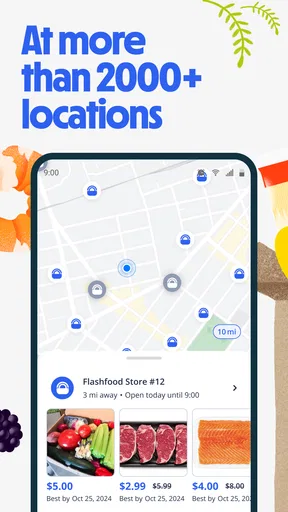
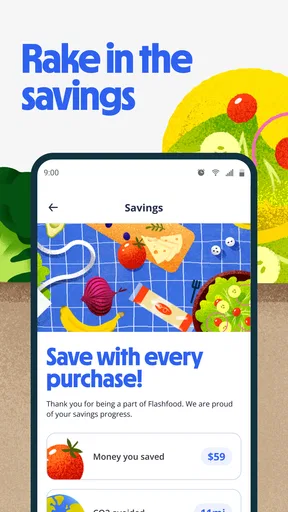
 Analysis by AppCompare
When I plan a grocery shop, I usually start with a list and a rough idea of what I’ll cook. Flashfood changes that starting point: instead of searching only for the exact ingredients I already had in mind, I can see what nearby participating stores have marked down and decide whether any of it fits my week. That makes it useful for flexible shoppers, but less suited to anyone who needs a particular item at a particular time.
Start with your real shopping needs
I’d treat this as a way to supplement a normal grocery run, not as a dependable replacement for one. Before browsing, it helps to think about what you can realistically use soon: a meal you can adapt, produce you already know how to prepare, or food that can be portioned and stored. A tempting discount is not much of a saving if the item doesn’t make it into a meal.
That distinction matters because availability is tied to local store offers rather than a fixed catalogue. I would open the app when I have some flexibility, then compare the visible deals with what is already in my kitchen. If nothing suits, I can stick with my usual list rather than building dinner around a purchase I don’t need.
From browsing to pickup
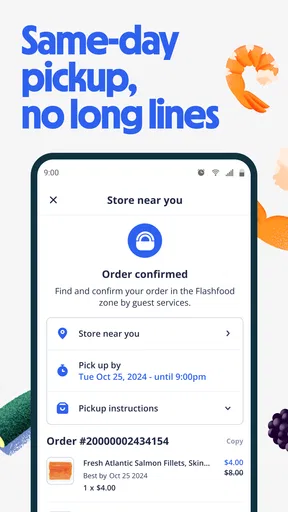
The flow is straightforward: browse participating stores, inspect the listed items and their pictures and prices, add suitable choices to the cart, pay in the app, and go to the store to collect the order. In my experience, the online part is convenient because I can make the decision before setting out, while the pickup step still requires a trip and a little coordination.
For example, imagine I’m heading home after work and have room to change the evening meal. I could check what is available near a store I can reasonably reach, choose something that complements what I already have, and collect it as part of that trip. The useful habit is to decide the pickup route before paying: a bargain at a store that sends me far out of my way may not be worth the extra time or travel.
There is also a handoff between the app and the store. The app is where I browse and pay; the store is where I collect the food. I would leave enough room in my plans to complete that second step rather than assume the purchase simply arrives at home. If I’m already making a grocery trip, pickup can fit naturally. If I’m rushed, the extra stop can erase some of the convenience.
What kind of shopper benefits most
This approach suits people who can adjust their meals around what they find, live or shop near participating stores, and are comfortable checking offers before making a detour. It can also help a household that plans several meals at once: one suitable discounted item may be easier to use when there are multiple people to share it or when the cook can adapt recipes.
Worth Reading Before You Choose

EA SPORTS FC Mobile 26 Is a Bigger Football Game, but It Takes Time

Flipboard Shows What News Apps Must Do Beyond the Feed

Switching to Android Auto Means Rethinking Your Driving Routine

Google Calendar Makes a Crowded Week Easier to Manage

Ludo King Makes the Most of the Minutes Between Plans

Baby Panda World Brings Quick Play to Modern Phones, but Its Game Library Feels Busy
It is a weaker fit for someone following a strict meal plan, needing a specific ingredient, or unable to collect an order during the available shopping routine. It may also frustrate shoppers who prefer choosing every item in person, since a listing and image cannot replace inspecting fresh food themselves. I’d keep a regular shop as the dependable backbone and use Flashfood for worthwhile extras.
Value, trade-offs, and trust
The savings are only one part of the decision. I’d weigh the displayed price against how much I can use, the distance to the store, and whether the timing works for my meals. Buying less than I need can still be sensible if it prevents waste at home; buying more than I can use just because it looks like a deal defeats the point.
The app’s focus on food nearing its sell-by date is also why I would make practical choices rather than treating every offer as an automatic bargain. I’d check the listing carefully, choose items I know how to handle, and plan when I’ll use them. That simple routine makes the purchase feel considered instead of impulsive, especially with perishable groceries.
Compared with ordinary grocery shopping, this is less about selecting a complete basket from a predictable range and more about responding to changing local offers. A standard store trip is better when I need control and certainty; Flashfood is more appealing when I have flexibility and want to check for a useful markdown. It also differs from general deal browsing because the pickup is tied to the grocery store, so the savings have to make sense in the context of an actual errand.
Flashfood Inc. developed this free Food & Drink app, and its Everyone age rating makes it broadly accessible. It has a 4.1 average from around 26,000 ratings, with more than a million installs. Version 3.6.0 supports devices running Android 9 or later. Those figures suggest a well-established service, but they don’t tell me whether a useful offer will be available at the stores I can reach; local fit is still what matters most.
If you are wondering whether you need to replace your usual grocery app, I wouldn’t. I’d use this alongside the way I already shop, checking it when I have time to compare an offer and collect it. If you want guaranteed ingredients or dislike making a separate stop, your normal store routine is the better choice. If you enjoy flexible meal planning, the extra browse can uncover a practical reason to change tonight’s menu.
If you're like me, always on the lookout for ways to save a buck while being kind to the planet, then you might want to check out Flashfood. This app is a game-changer for anyone who loves a good deal and hates food waste. Let me take you through my experience with it.
Discovering Deals
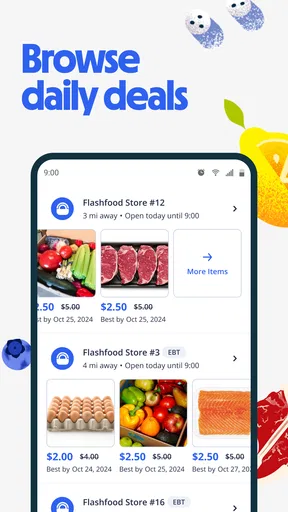
Once you dive into the Flashfood app, you'll find yourself in a wonderland of discounted groceries. The app connects users with local grocery stores offering products that are nearing their sell-by dates at a fraction of the cost. It's like a treasure hunt, and every day brings new surprises.
The interface is super user-friendly. Even if you're not tech-savvy, navigating through the app is a breeze. You can easily browse the deals at stores near you, and the best part? You can do it all while lying on your couch.
How It Works
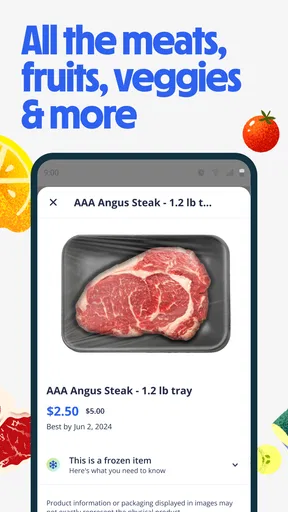
After logging in, you’re presented with a list of participating stores. Each store shows the items available, complete with pictures and prices. It feels a bit like online grocery shopping, but with the added thrill of snagging a bargain.
What I found really cool is how straightforward it is to make a purchase. You just add items to your cart, pay through the app, and then head to the store to pick them up. No more waiting in long checkout lines! Plus, the app sends you notifications whenever new deals pop up, so you never miss out.
Saving Money and the Planet
Using Flashfood is not just about saving money—though that’s a huge perk. It’s also about making a positive impact on the environment. By buying food that might otherwise go to waste, you’re contributing to a more sustainable future. It’s a win-win situation.
And let's not forget the variety. From fresh produce to bakery items and meats, the selection can be surprisingly vast depending on the day. It’s perfect if you’re flexible with your shopping list and enjoy a bit of culinary adventure.
User Experience
The app runs smoothly, and I didn’t encounter any bugs or crashes during my time with it. Everything loads quickly, and the images are clear. It really helps to see exactly what you’re buying, especially when it comes to perishable goods.
I also appreciate the customer support feature. If you ever run into an issue, the app provides easy access to help. It’s reassuring to know that assistance is just a tap away.
Final Thoughts
I’ve been recommending Flashfood to everyone I know. It’s such a smart idea, executed really well. Whether you’re a budgeting pro or someone who simply loves a good deal, this app is worth checking out.
Not only are you saving money, but you’re also supporting a sustainable movement by reducing food waste. So, why not give it a try? You might just find your new favorite way to shop.
Pros
- Saves money with significant grocery discounts.
- Easy-to-use interface for quick navigation.
- Reduces food waste by selling surplus items.
- Offers a wide variety of grocery items.
- Real-time notifications for new deals.
Cons
- Limited availability in some regions.
- Requires frequent app checks for best deals.
- Not all grocery stores are partnered.
- Some deals may sell out quickly.
- Delivery options are not always available.
FAQs for Flashfood—Grocery deals
What is Flashfood and how does it work?
Flashfood is an app that helps you save money on groceries by offering deals on surplus food items nearing their best-before dates. Users can browse through available deals at nearby participating stores, purchase items directly through the app, and pick them up at the store. It’s a convenient way to reduce food waste and save money.
Which stores participate with Flashfood?
Flashfood partners with a variety of grocery stores across North America. The availability of participating stores depends on your location. To find out which stores near you participate, download the app and enter your location. The app will display a list of nearby stores offering discounted items.
Is Flashfood safe to use for finding grocery deals?
Yes, Flashfood is safe to use. The app partners with reputable grocery stores that ensure the quality and safety of the food items listed. All items are nearing their best-before dates but are still safe to consume. Always check product details and use your discretion when purchasing items.
How do I pay for items on Flashfood?
Purchases on Flashfood are made directly through the app using a credit or debit card. Once you select the items you wish to buy, you can securely process the payment within the app. After the transaction is complete, you will receive a confirmation and instructions on where to pick up your items.
Can I get a refund if I'm not satisfied with my purchase?
Flashfood has a customer service policy in place to handle issues like unsatisfactory purchases. If there’s a problem with your order, contact their support team through the app. Refunds or resolutions are typically handled on a case-by-case basis, ensuring customer satisfaction and trust.


